
History: CursWiki06_TraduccioCatWikiAdmin2_orig_angles
Comparing version 10 with version 24
de http://doc.tikiwiki.org/tiki-index.php?page=Wiki+Admin  Impressió múltipleSi està actiu, es proporciona una secció on un usuari pot seleccionar diverses pàgines Wiki i aleshores veure-les en una versió llesta per a imprimir. Això és pot utilitzar per a imprimir diverses pàgines.Generació de PDFSi està actiu, les pàgines Wiki es poden convertir a format PDF per impressió, arxiu, o altres propòsits.ComentarisSi està actiu, les pàgines Wiki poden tenir comentaris. Aquesta característica sobreescriu la característica Discussió Wiki, pots llegir la nota sobre comentaris/discussió de pàgines Wiki al final d'aquesta pàgina.Corrector de paraulesSi està actiu, el corrector de paraules pot usar-se per a pàgines Wiki.Edicions MenorsEls usuaris amb el permís adequat poden fer canvis menors a les pàgines Wiki. Els canvis menors no es reflexen a l'historial i no es notifiquen als usuaris que estan vigilant la pàgina.Usar plantillesSi està actiu, es poden usar plantilles per a editar pàgines Wiki. L'usuari que està editant una pàgina pot seleccionar una de les plantilles disponibles per a pàgines Wiki. Es pot llegit ContentTemplatesDoc? per a aprendre com crear plantilles per a pàgines Wiki.Avís en editarSi està actiu, aleshores quan un usuari està editant una pàgina el botó d'editarIf enabled then when a user is editing a page the edit button will be colored red and the name of the user editing the page will be displayed as a tooltip. If the user saves or cancels his or her edit or if the indicated amount of time passes the edit button will be displayed normally. This feature is useful to prevent collisions when editing pages. PicturesIf enabled users can quickly add an image to a Wiki page by simply uploading the picture when editing a page. The picture will be stored in img/wiki_up using the name of the picture as an Id.Use page descriptionIf enabled a description can be entered when editing a page and descriptions will be displayed below the page name when viewing a page.Show page titleIf enabled the page title will be displayed. If disabled no title will be displayed (and it will be hard to know what page you are editing!).Cache Wiki pagesIf enabled then Wiki pages can be cached, so the Tiki engine will not have to parse the page content to display it. After the indicated time passes or if the page is changed, the cache is invalidated.FootnotesIf enabled logged users can write personal footnotes when editing a page. The footnotes will be displayed only to the user who edited them inmediately below the Wiki page. This can be used as a good way to let users make personal notes and observations about pages.Users can save to notepadIf enabled and if the user's notepad feature is enabled and if the user is logged a save icon will be shown when viewing a page, letting the user save the page to his or her personal notepad.Users can lock pagesIf enabled then users with permission to lock pages can lock pages and only the user who locked a page or admin can unlock it.Use WikiWords?If enabled then words using the Wiki naming convention of Smashed words will automatically become links. WikiWords? start with capital letters and include capitals in the middle of the word (example: ThisIsAWikiWord).Page creators are admin of their pagesIf enabled then users who create a page are also in control of that page. They have administrators rights over it.Table syntaxThis selects the syntax to be used for new rows in tables. Can be || or "\n" (line break).Example of both ways for inserting a new row
Automonospaced textIf this is enabled, the Tiki code lines starting with at least one space are interpreted and rendered with monospaced font. Generally if you have occasional users this can get them puzzled and wondering what's happening.Uses SlideshowIf enabled users can generate slideshows from structures.
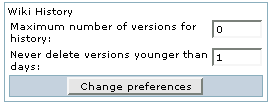
Wiki HistoryThis panel is to control the deletion of old versions of Wiki pages.Maximum number of versions for historydetermines how many versions of a Wiki page will be kept before older versions are deleted. This affects the level of undo that is possible, but also how much of the page's evolution you can see. This can be useful in a highly collaborative environment where it seems that some elements don't make sense anymore. Never delete versions younger than days can be used as a basic way to avoid vandals or to make sure that editors can review all the changes done to a page if many edits were done in a short time.

Copyright Management
Wiki Watch
|
de http://doc.tikiwiki.org/tiki-index.php?page=Wiki+Admin Impressió múltipleSi està actiu, es proporciona una secció on un usuari pot seleccionar diverses pàgines Wiki i aleshores veure-les en una versió llesta per a imprimir. Això és pot utilitzar per a imprimir diverses pàgines.Generació de PDFSi està actiu, les pàgines Wiki es poden convertir a format PDF per impressió, arxiu, o altres propòsits.ComentarisSi està actiu, les pàgines Wiki poden tenir comentaris. Aquesta característica sobreescriu la característica Discussió Wiki, pots llegir la nota sobre comentaris/discussió de pàgines Wiki al final d'aquesta pàgina.Corrector de paraulesSi està actiu, el corrector de paraules pot usar-se per a pàgines Wiki.Edicions MenorsEls usuaris amb el permís adequat poden fer canvis menors a les pàgines Wiki. Els canvis menors no es reflexen a l'historial i no es notifiquen als usuaris que estan vigilant la pàgina.Usar plantillesSi està actiu, es poden usar plantilles per a editar pàgines Wiki. L'usuari que està editant una pàgina pot seleccionar una de les plantilles disponibles per a pàgines Wiki. Es pot llegit ContentTemplatesDoc? per a aprendre com crear plantilles per a pàgines Wiki.Avís en editarSi està actiu, aleshores quan un usuari està editant una pàgina el botó d'editar es posarà de color vermell i el nom de l'usuari que edita la pàgina sortirà com a pista. Si l'usuari salva o cancel·la la seva edició, o si passa l'espai de temps indicat,(i aqui una captura de pantalla del menu...) 
If enabled then when a user is editing a page the edit button will be colored red and the name of the user editing the page will be displayed as a tooltip. If the user saves or cancels his or her edit or if the indicated amount of time passes the edit button will be displayed normally. This feature is useful to prevent collisions when editing pages. PicturesIf enabled users can quickly add an image to a Wiki page by simply uploading the picture when editing a page. The picture will be stored in img/wiki_up using the name of the picture as an Id.Use page descriptionIf enabled a description can be entered when editing a page and descriptions will be displayed below the page name when viewing a page.Show page titleIf enabled the page title will be displayed. If disabled no title will be displayed (and it will be hard to know what page you are editing!).Cache Wiki pagesIf enabled then Wiki pages can be cached, so the Tiki engine will not have to parse the page content to display it. After the indicated time passes or if the page is changed, the cache is invalidated.FootnotesIf enabled logged users can write personal footnotes when editing a page. The footnotes will be displayed only to the user who edited them inmediately below the Wiki page. This can be used as a good way to let users make personal notes and observations about pages.Users can save to notepadIf enabled and if the user's notepad feature is enabled and if the user is logged a save icon will be shown when viewing a page, letting the user save the page to his or her personal notepad.Users can lock pagesIf enabled then users with permission to lock pages can lock pages and only the user who locked a page or admin can unlock it.Use WikiWords?If enabled then words using the Wiki naming convention of Smashed words will automatically become links. WikiWords? start with capital letters and include capitals in the middle of the word (example: ThisIsAWikiWord).Page creators are admin of their pagesIf enabled then users who create a page are also in control of that page. They have administrators rights over it.Table syntaxThis selects the syntax to be used for new rows in tables. Can be || or "\n" (line break).Example of both ways for inserting a new row
Automonospaced textIf this is enabled, the Tiki code lines starting with at least one space are interpreted and rendered with monospaced font. Generally if you have occasional users this can get them puzzled and wondering what's happening.Uses SlideshowIf enabled users can generate slideshows from structures.
Wiki HistoryThis panel is to control the deletion of old versions of Wiki pages.Maximum number of versions for historydetermines how many versions of a Wiki page will be kept before older versions are deleted. This affects the level of undo that is possible, but also how much of the page's evolution you can see. This can be useful in a highly collaborative environment where it seems that some elements don't make sense anymore. Never delete versions younger than days can be used as a basic way to avoid vandals or to make sure that editors can review all the changes done to a page if many edits were done in a short time.
Copyright Management
Wiki Watch
Copyright 2005 Jordi Domingo i Roquer <!-- Licencia de Creative Commons --> <a rel="license" href="http://creativecommons.org/licenses/by-nc-nd/2.0/"><img alt="Licencia de Creative Commons" border="0" src="http://creativecommons.org/images/public/somerights20.gif" /></a><br /> Esta obra está bajo una <a rel="license" href="http://creativecommons.org/licenses/by-nc-nd/2.0/">licencia de Creative Commons</a>. <!-- /Licencia de Creative Commons --> <!-- <rdf:RDF xmlns="http://web.resource.org/cc/" xmlns:dc="http://purl.org/dc/elements/1.1/" xmlns:rdf="http://www.w3.org/1999/02/22-rdf-syntax-ns#"> <Work rdf:about=""> <dc:type rdf:resource="http://purl.org/dc/dcmitype/Text" /> <license rdf:resource="http://creativecommons.org/licenses/by-nc-nd/2.0/" /> </Work> <License rdf:about="http://creativecommons.org/licenses/by-nc-nd/2.0/"> <permits rdf:resource="http://web.resource.org/cc/Reproduction" /> <permits rdf:resource="http://web.resource.org/cc/Distribution" /> <requires rdf:resource="http://web.resource.org/cc/Notice" /> <requires rdf:resource="http://web.resource.org/cc/Attribution" /> <prohibits rdf:resource="http://web.resource.org/cc/CommercialUse" /> </License> </rdf:RDF> --> |
||||||||||||||


History
Col·laboren
![[toggle]](img/icons/module.png "[toggle]")
![[toggle]](javascript:icntoggle('mod-Logos_col_laborenr20','module.png'); "[toggle]")

Traduccions automàtiques
![[toggle]](javascript:icntoggle('mod-Traduccio_internostrumr30','module.png'); "[toggle]")

