
History: CursWiki3_P3_TraduccioWikiAdmin1
Comparing version 10 with version 13
Wiki AdminTable of contents
Acceso AdminPara acceder a Administración, ve a Inicio y, en el Menu (Principal), clica en "Admin {clica)".Secciones: Administración del Panel de Administración TikiAccederás a el Panel de Administración de Tiki Secciones, como se ve en el siguiente gráfico: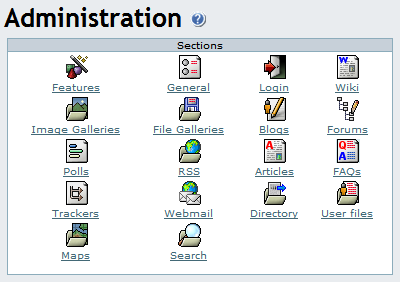
Prefertencias de Wiki:: Wiki
WikiDesde el panel de Adminstración, clica el icono de Wiki para mostrar su panel de configuración, cuya parte superior es algo así como: 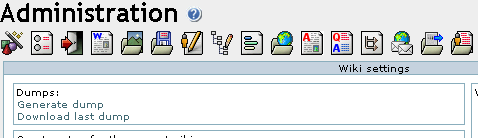
VolcadoEsta sección se puede usar para generar/descargar un volcado XHTML de tu Wiki que se puede usar para navegar offline, distribuir el Wiki en un CD, presentaciones sin conexión, etc.
Configuración de comentarios de Wiki
Adjuntos WikiUna página Wiki puede tener adjuntos. En este panel de control `puedes configurar si los adjuntos están parmitidos y dónde se almacenan los archivos. Puedes almacenar los archivos en una base de datos o en un directorio. La ruta del directoriopuede ser absoluta o relativa. A Wiki page can have attached files. In this panel you can configure whether attachments are allowed and where to store the files. You can store attachments in the database or a directory. The directory path can be absolute (example: /foo/bar/uploads/) or relative to the Tiki directory (example: files/).
 The trailing slash is mandatory.
{=http://doc.tikiwiki.org/img/wiki_up/doc.tikiwiki.org/WikiAdminAttachments.png} Export Wiki PagesThe Export link can be used to export all your Wiki pages to a PHPWiki compatible format. Then you can import pages if you want using the Import PHPWiki Dump link in the Admin menu. Each page is exported to a file where all the versions of the page are stored in MIME format.
{=http://doc.tikiwiki.org/img/wiki_up/doc.tikiwiki.org/WikiAdminExport.png} Remove unused picturesThis link can be used to remove all the pictures that are stored in the Wiki pictures directory (img/wiki_up) but are not referenced in any Wiki page.
{=http://doc.tikiwiki.org/img/wiki_up/doc.tikiwiki.org/WikiAdminRemove.png} Wiki Home PageIndicates the name of the page that will be the HomePage for your Wiki.

Wiki DiscussionDiscuss pages on forums activates a discuss button on every Wiki page that takes users to a thread in the specified forum for that particular page. The forum must be created before, if not created. This allows users to create an open discourse about pages using the public forums. If the thread for a page does not exist, Tiki creates it.Note: Wiki Discussion feature overlaps the Comments feature and was introduced because of the difficulty to spot new comments in a Wiki with many pages but this is not problematic anymore. It is similar to the Comments features and the two can be used at the same time although it is probably better to use only one.

Wiki Link FormatThis control can be used to control recognition of Wiki links using the two parenthesis Wiki link syntax ((page name)).

Wiki page list configurationSimply determines which columns will show in the Pages screen (available as List pages in the Wiki menu).

Wiki featuresThis section can be used to enable/disable specific Wiki features.
SandboxThe Sandbox page allows users to practice their Wiki page editing skills. The Sandbox is a special page where everybody has write permission and no history is saved.Last ChangesThis feature displays the last changes to the Wiki.DumpIf enabled dumps can be used.HistoryIf enabled users can see the history of each Wiki page.List PagesIf enabled users can see the list of Wiki pages--like a directory of Wiki pages.BacklinksAllows users to view a list of pages that link to the current page |
Wiki AdminTable of contents
Acceso AdminPara acceder a Administración, ve a Inicio y, en el Menu (Principal), clica en "Admin {clica)".Secciones: Administración del Panel de Administración TikiAccederás a el Panel de Administración de Tiki Secciones, como se ve en el siguiente gráfico:
Prefertencias de Wiki::
WikiDesde el panel de Adminstración, clica el icono de Wiki para mostrar su panel de configuración, cuya parte superior es algo así como:
VolcadoEsta sección se puede usar para generar/descargar un volcado XHTML de tu Wiki que se puede usar para navegar offline, distribuir el Wiki en un CD, presentaciones sin conexión, etc.
Configuración de comentarios de Wiki
Adjuntos WikiUna página Wiki puede tener adjuntos. En este panel de control `puedes configurar si los adjuntos están parmitidos y dónde se almacenan los archivos. Puedes almacenar los archivos en una base de datos o en un directorio. La ruta del directoriopuede ser absoluta o relativa. A Wiki page can have attached files. In this panel you can configure whether attachments are allowed and where to store the files. You can store attachments in the database or a directory. The directory path can be absolute (example: /foo/bar/uploads/) or relative to the Tiki directory (example: files/).
The trailing slash is mandatory.{=http://doc.tikiwiki.org/img/wiki_up/doc.tikiwiki.org/WikiAdminAttachments.png} Export Wiki PagesThe Export link can be used to export all your Wiki pages to a PHPWiki compatible format. Then you can import pages if you want using the Import PHPWiki Dump link in the Admin menu. Each page is exported to a file where all the versions of the page are stored in MIME format.
{=http://doc.tikiwiki.org/img/wiki_up/doc.tikiwiki.org/WikiAdminExport.png} Remove unused picturesThis link can be used to remove all the pictures that are stored in the Wiki pictures directory (img/wiki_up) but are not referenced in any Wiki page.
{=http://doc.tikiwiki.org/img/wiki_up/doc.tikiwiki.org/WikiAdminRemove.png} Wiki Home PageIndicates the name of the page that will be the HomePage for your Wiki.
Wiki DiscussionDiscuss pages on forums activates a discuss button on every Wiki page that takes users to a thread in the specified forum for that particular page. The forum must be created before, if not created. This allows users to create an open discourse about pages using the public forums. If the thread for a page does not exist, Tiki creates it.Note: Wiki Discussion feature overlaps the Comments feature and was introduced because of the difficulty to spot new comments in a Wiki with many pages but this is not problematic anymore. It is similar to the Comments features and the two can be used at the same time although it is probably better to use only one.
Wiki Link FormatThis control can be used to control recognition of Wiki links using the two parenthesis Wiki link syntax ((page name)).
Wiki page list configurationSimply determines which columns will show in the Pages screen (available as List pages in the Wiki menu).
Wiki featuresThis section can be used to enable/disable specific Wiki features.
SandboxThe Sandbox page allows users to practice their Wiki page editing skills. The Sandbox is a special page where everybody has write permission and no history is saved.Last ChangesThis feature displays the last changes to the Wiki.DumpIf enabled dumps can be used.HistoryIf enabled users can see the history of each Wiki page.List PagesIf enabled users can see the list of Wiki pages--like a directory of Wiki pages.BacklinksAllows users to view a list of pages that link to the current page<!-- Llicència de Creative Commons --> <a rel="license" href="http://creativecommons.org/licenses/by-sa/2.0/es/"><img alt="Llicència de Creative Commons" border="0" src="http://creativecommons.org/images/public/somerights20.gif" /></a><br /> Aquesta obra està sota una <a rel="license" href="http://creativecommons.org/licenses/by-sa/2.0/es/">Llicència de Creative Commons</a>. <!-- /Llicència de Creative Commons --> <!-- <rdf:RDF xmlns="http://web.resource.org/cc/" xmlns:dc="http://purl.org/dc/elements/1.1/" xmlns:rdf="http://www.w3.org/1999/02/22-rdf-syntax-ns#"> <Work rdf:about=""> <license rdf:resource="http://creativecommons.org/licenses/by-sa/2.0/es/" /> </Work> <License rdf:about="http://creativecommons.org/licenses/by-sa/2.0/es/"> <permits rdf:resource="http://web.resource.org/cc/Reproduction" /> <permits rdf:resource="http://web.resource.org/cc/Distribution" /> <requires rdf:resource="http://web.resource.org/cc/Notice" /> <requires rdf:resource="http://web.resource.org/cc/Attribution" /> <permits rdf:resource="http://web.resource.org/cc/DerivativeWorks" /> <requires rdf:resource="http://web.resource.org/cc/ShareAlike" /> </License> </rdf:RDF> --> Elisenda Trilla Víctor Guillamón Carlos Aguado Copyright 2004 |
||||||||||


History
Col·laboren
![[toggle]](img/icons/module.png "[toggle]")
![[toggle]](javascript:icntoggle('mod-Logos_col_laborenr20','module.png'); "[toggle]")

Traduccions automàtiques
![[toggle]](javascript:icntoggle('mod-Traduccio_internostrumr30','module.png'); "[toggle]")

